OpenROAD Flow Scripts (ORFS) and OpenROAD
This is the single reference document for everything ORFS- and OpenROAD-related in this repository. It covers installing the Dockerised flow, running an example end-to-end, porting a new design, building OpenROAD from source, and driving the OpenROAD database directly from Python or Tcl.
Table of contents
Installation
The supported install path runs ORFS inside a Docker container that Ships the pinned OpenROAD, Yosys, OpenSTA, KLayout, and other tool binaries. You need Docker installed and nothing else.
Clone ORFS
git clone https://github.com/The-OpenROAD-Project/OpenROAD-flow-scripts.git
cd OpenROAD-flow-scripts
Run the Docker image
Place the following script in the root of the cloned repo as runorfs.sh:
#!/bin/bash

# Use first argument as tag if provided
if [ -n "$1" ]; then
  tag="$1"
  echo "Using user-specified tag: $tag"
else
  tag=$(git describe --tags 2>/dev/null)
  if [ -n "$tag" ]; then
    echo "Using Git tag: $tag"
  else
    echo "Warning: No tag specified and commit is not on a tag. Defaulting to 'latest'."
    tag="latest"
  fi
fi

echo "Running OpenROAD flow with tag: ${tag}"
docker run --rm -it \
  -u $(id -u ${USER}):$(id -g ${USER}) \
  -v $(pwd)/flow:/OpenROAD-flow-scripts/flow \
  -v $(pwd)/..:/OpenROAD-flow-scripts/UCSC_ML_suite \
  -e DISPLAY=${DISPLAY} \
  -v /tmp/.X11-unix:/tmp/.X11-unix \
  -v ${HOME}/.Xauthority:/.Xauthority \
  --network host \
  --security-opt seccomp=unconfined \
  openroad/orfs:${tag}
Make it executable:
chmod +x runorfs.sh
The script exports your X display so GUI applications work inside the container and mounts flow/ from your workspace into the image, so designs, scripts, and results are editable from both sides.
Run the version matching your ORFS checkout, or pass an explicit tag:
# version matching your ORFS checkout
./runorfs.sh

# specific tag
git checkout v3.0-3141-gb6d79b23
./runorfs.sh v3.0-3141-gb6d79b23

# or a commit ID
git checkout 7fcc19
./runorfs.sh 7fcc19
Common problems
Beware — your cloned version of ORFS should match the version of the Docker image that you run. If it doesn’t, command interfaces may have diverged. runorfs.sh handles this automatically via git describe --tags, but only if you cloned ORFS with its full history. A git clone --depth 1 will have no tags and silently fall back to openroad/orfs:latest, which may not match the scripts you just cloned. Prefer a full clone, or pass an explicit tag to ./runorfs.sh.
Recent openroad/orfs:latest images are built with AVX-512 instructions and will crash partway through the flow with “child killed: illegal instruction” on CPUs that do not support it (this includes most pre-Ice-Lake Intel desktops and every Zen / Zen 2 / Zen 3 AMD part). If you see that error, use make LEC_CHECK=0 to skip the resizer’s logical equivalence check that requires AVX-512.
You can safely ignore the message groups: cannot find name for group ID 1000 when the Docker image starts.
Smoke test
Inside the container:
I have no name!@diode:/OpenROAD-flow-scripts$ cd flow
I have no name!@diode:/OpenROAD-flow-scripts/flow$ make
This runs the default GCD (Greatest Common Divisor) design through the Nangate 45 nm platform end to end. You should see a lot of output and a final summary table (see Walkthrough for the full breakdown).
Note — a few WARNING lines are expected; any Error is not.
To view the final result graphically:
I have no name!@diode:/OpenROAD-flow-scripts/flow$ make gui_final
which should open the GCD design like this:

X11 troubleshooting
If GUI applications inside the container fail with:
Authorization required, but no authorization protocol specified
Could not load the Qt platform plugin "xcb" in "" even though it was found.
run:
xhost +local:
on the host before you start the Docker image. This lets the container talk to your X server.
Walkthrough
This section assumes the Installation smoke test works.
The documentation is at OpenROAD ReadTheDocs.
The general flow steps ORFS runs are:
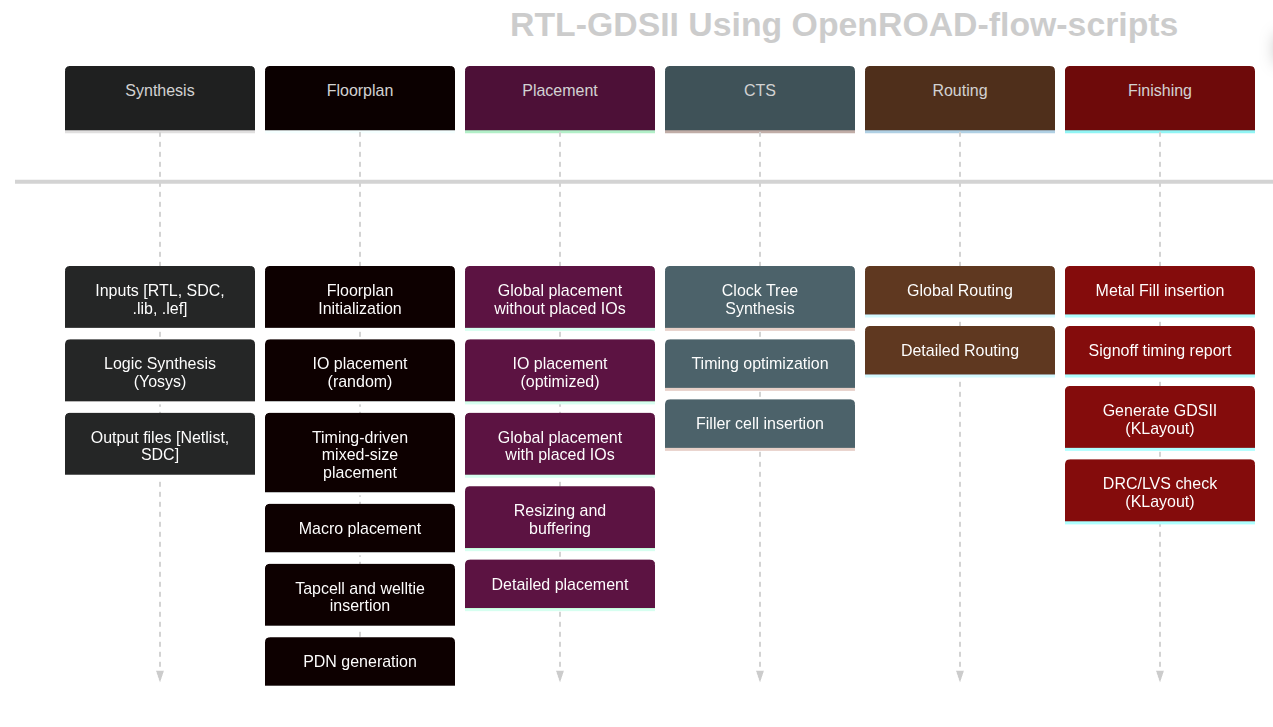
A successful run ends with a table like:
Log                        Elapsed/s Peak Memory/MB  sha1sum .odb [0:20)
1_1_yosys_canonicalize             0             38 45af71d069285cb71fba
1_2_yosys                          0             37 8f4f1609d45714b16838
1_synth                            0            102 2c0cb35f152969a57a97
2_1_floorplan                      0            121 4c0c21a703c4514a4f9e
2_2_floorplan_macro                0             98 4c0c21a703c4514a4f9e
2_3_floorplan_tapcell              0             98 41d55f307cb9baec622e
2_4_floorplan_pdn                  0            101 4b02fdf1131f9ecfb828
3_1_place_gp_skip_io              18            102 c60b97e4377b3a96d8c4
3_2_place_iop                      0            100 e10d623fff656d759c03
3_3_place_gp                      17            212 611a676ae84b63e3582b
3_4_place_resized                  0            119 611a676ae84b63e3582b
3_5_place_dp                       0            106 6f409421b824c2937041
4_1_cts                            2            128 3ae290878676cd808502
5_1_grt                           21            218 cc66d1cd20f7651b10e1
5_2_route                         25           2369 cfb6ef9f4d29c356f88b
5_3_fillcell                       0            101 e40b0e5835f90ee733e0
6_1_fill                           0             99 e40b0e5835f90ee733e0
6_1_merge                          2            424
6_report                           2            157
Total                             87           2369
What each step does:
- 1_1_yosys_canonicalize — normalises the input Verilog.
- 1_2_yosys — logic synthesis with Yosys.
- 1_synth — post-processes the synthesised netlist for the flow.
- 2_1_floorplan — determines floorplan area and aspect ratio.
- 2_2_floorplan_macro — places fixed-size macro blocks (e.g. SRAMs).
- 2_3_floorplan_tapcell — inserts tap cells.
- 2_4_floorplan_pdn — builds the power ring and/or power straps.
- 3_1_place_gp_skip_io — global placement excluding I/O.
- 3_2_place_iop — places I/O cells around the perimeter.
- 3_3_place_gp — global placement of the gates.
- 3_4_place_resized — global-placement timing optimisation (resizing, buffering).
- 3_5_place_dp — detailed placement of the gates.
- 4_1_cts — clock tree synthesis (CTS).
- 5_1_grt — global routing.
- 5_2_route — detailed routing.
- 5_3_fillcell — adds fill cells to row positions without cells.
- 6_1_fill — adds routing fill to the design.
- 6_1_merge — merges the GDS of library cells into the design.
- 6_report — final design reporting (timing, area, power).
Running different designs and technologies
make alone runs the default design. To pick another, pass the design’s config.mk via DESIGN_CONFIG:
make DESIGN_CONFIG=./designs/nangate45/gcd/config.mk
Same design on ASAP7:
make DESIGN_CONFIG=./designs/asap7/gcd/config.mk
The general form:
make DESIGN_CONFIG=designs/<PLATFORM>/<DESIGN>/config.mk
where PLATFORM is the technology (nangate45, asap7, sky130hd, etc.) and DESIGN is the design name (gcd, etc.).
Viewing the final design
make DESIGN_CONFIG=./designs/nangate45/gcd/config.mk gui_final
Cleaning up
There are targets to clean individual steps or the whole flow:
clean_synthclean_floorplanclean_placeclean_ctsclean_routeclean_finishclean_all
For example:
make DESIGN_CONFIG=./designs/asap7/gcd/config.mk clean_all
Running individual steps
make DESIGN_CONFIG=designs/<PLATFORM>/<DESIGN>/config.mk <STEP>
where STEP is synth, floorplan, place, cts, route, or finish. Useful for iterating on one phase — e.g. to debug global routing, repeat:
make DESIGN_CONFIG=designs/<PLATFORM>/<DESIGN>/config.mk clean_route
make DESIGN_CONFIG=designs/<PLATFORM>/<DESIGN>/config.mk route
As long as you don’t touch features that affect earlier stages, this is safe. If you modify something that changes the floorplan, clean from clean_floorplan onward.
Interactive Tcl usage
To run openroad interactively outside the Makefile, first set up your PATH by sourcing the environment script (the Makefile does this automatically):
source env.sh
Verify with:
which openroad
which should point to:
OpenROAD-flow-scripts/tools/install/OpenROAD/bin/openroad
For an interactive Tcl console pre-configured for a specific design:
make DESIGN_CONFIG=designs/<PLATFORM>/<DESIGN>/config.mk bash
source env.sh
openroad <tcl file>
make bash sets SCRIPTS_DIR, LEF_FILES, LIB_FILES, etc. so the ORFS scripts under flow/scripts work. For example, to read a design after CTS:
source $::env(SCRIPTS_DIR)/load.tcl
load_design 4_cts.odb 4_cts.sdc
Because the config file specifies design and technology, you only name the ODB and SDC.
Directory structure
Outputs land in:
| Path | Contents |
|---|---|
results/<PLATFORM>/<DESIGN>/base/ | Final files (GDS, DEF, ODB, SDC, SPEF, …) |
logs/<PLATFORM>/<DESIGN>/base/ | One log per flow step |
reports/<PLATFORM>/<DESIGN>/base/ | Per-step reports (timing, area, power, …) |
Config files
A config file parameterises one design in one technology. The key variables:
# Specifies the technology subdirectory.
export PLATFORM    = nangate45
# Input file list (a single file or a list of files).
export VERILOG_FILES = $(DESIGN_HOME)/src/$(DESIGN_NAME)/gcd.v
# The timing constraint file.
export SDC_FILE      = $(DESIGN_HOME)/$(PLATFORM)/$(DESIGN_NAME)/constraint.sdc
# Pick a floorplan size so the logic cells use 55% of the area.
export CORE_UTILIZATION ?= 55
The full list of overridable variables is at Flow Variables. Many have reasonable defaults; your config only specifies what differs. make bash sources the defaults followed by your config.
Help
There is an ORFS tutorial upstream.
OpenROAD exposes man pages at three levels:
- Level 1 — top-level openroad command (
man openroad) - Level 2 — individual module / Tcl commands (
man clock_tree_synthesis) - Level 3 — info / error / warning codes (
man CTS-0001)
Documentation:
- OpenROAD: https://openroad.readthedocs.io/en/latest/
- ORFS: https://openroad-flow-scripts.readthedocs.io/en/latest/
Porting a Design
Porting a design to ORFS is three steps:
- Add your Verilog source to
OpenROAD-flow-scripts/flow/designs/src/<your-design>. - Create a design folder and
*.sdc/*.mkfor each technology you target. - Update
OpenROAD-flow-scripts/flow/Makefileto include a target for your design.
Example: porting sha256
sha256 is a cryptographic hash function that can be implemented as a hardware accelerator. The RTL lives in this directory.
Add source. Copy the RTL Verilog files to OpenROAD-flow-scripts/flow/designs/src/sha256.
Create a design config. Assume we target sky130hd. Create OpenROAD-flow-scripts/flow/designs/sha256/. At a minimum this folder needs a config.mk (target platform, source files, flow knobs), constraint.sdc (timing constraints), and a rules-base.json (DRC metric checks).
designs/sha256/config.mk
The config file requires DESIGN_NAME, PLATFORM, VERILOG_FILES, and SDC_FILE:
export DESIGN_NAME = sha256   # Module name of top-level instance
export PLATFORM    = sky130hd # Intended platform
export VERILOG_FILES = $(sort $(wildcard $(DESIGN_HOME)/src/$(DESIGN_NICKNAME)/*.v))
export SDC_FILE      = $(DESIGN_HOME)/$(PLATFORM)/$(DESIGN_NICKNAME)/constraint.sdc
Note: the design name sha256 is not arbitrary. The top-level sha256.v instantiates a module named sha256. Note the clock name as well — it must match constraint.sdc.
You can add knobs like CORE_UTILIZATION (fraction of core area used) or PLACE_DENSITY (cell density during placement). The full list is in the Flow Variables.
A more complete sha256 config:
export DESIGN_NICKNAME = sha256
export DESIGN_NAME = sha256
export PLATFORM    = sky130hd

export VERILOG_FILES = $(sort $(wildcard $(DESIGN_HOME)/src/$(DESIGN_NICKNAME)/*.v))
export SDC_FILE      = $(DESIGN_HOME)/$(PLATFORM)/$(DESIGN_NICKNAME)/constraint.sdc

export CORE_UTILIZATION = 40
export TNS_END_PERCENT = 100

export CTS_CLUSTER_SIZE = 25
export CTS_CLUSTER_DIAMETER = 45
(Optional) designs/sha256/fastroute.tcl
You can tune global routing per design. fastroute.tcl lets you pin routing layers (and separate clock vs signal):
set_global_routing_layer_adjustment $::env(MIN_ROUTING_LAYER)-$::env(MAX_ROUTING_LAYER) 0.4

set_routing_layers -clock $::env(MIN_CLK_ROUTING_LAYER)-$::env(MAX_ROUTING_LAYER)
set_routing_layers -signal $::env(MIN_ROUTING_LAYER)-$::env(MAX_ROUTING_LAYER)
designs/sha256/constraint.sdc
The SDC file carries clock speed and I/O timing. See SDC constraints for the syntax.
Ensure the clock name matches the top-level Verilog.
current_design sha256

set clk_name  clk
set clk_port_name clk
set clk_period 6.5
set clk_io_pct 0.25

set clk_port [get_ports $clk_port_name]

create_clock -name $clk_name -period $clk_period $clk_port

set non_clock_inputs [lsearch -inline -all -not -exact [all_inputs] $clk_port]

set_input_delay  [expr $clk_period * $clk_io_pct] -clock $clk_name $non_clock_inputs
set_output_delay [expr $clk_period * $clk_io_pct] -clock $clk_name [all_outputs]
Update the ORFS Makefile
Append DESIGN_CONFIG=./designs/sky130hd/sha256/config.mk to the Makefile, uncomment it, and run make to launch the flow.
Still TODO in this tutorial
- Defining
sha256/rules-base.json. - Replacing a ported design’s RAM with
fakeRAM. - Porting designs written in SystemVerilog using
SYNTH_HDL_FRONTEND(Slang).
Building from Source
Most users will not need to build OpenROAD from source. Prefer the prebuilt image in Installation unless you need to modify the source. You can build either inside Docker or locally. On WSL, use the local method.
BEWARE: if you have local copies of Yosys, OpenSTA, or OpenROAD on your PATH, they take priority over what’s in the Docker image. If you’ve taken CSE 125 / 225, you may already have Yosys installed locally.
Clone the repository
git clone https://github.com/The-OpenROAD-Project/OpenROAD-flow-scripts.git
cd OpenROAD-flow-scripts
Run all subsequent commands from the repo root unless noted otherwise.
Docker build
The dependencies live inside the build image, so there’s nothing to install beyond Docker.
./build_openroad.sh
Docker is the default build method, so no flag is needed.
To add debug symbols when building in Docker, edit tools/OpenROAD/docker/Dockerfile.builder and append CMake flags to the build command:
RUN ./etc/Build.sh -compiler=${compiler} -threads=${numThreads} -deps-prefixes-file=${depsPrefixFile} -cmake="-DCMAKE_BUILD_TYPE=DEBUG"
Note: the --openroad-args argument to ./build_openroad.sh is not forwarded to the Docker build scripts, so you can’t enable debug the same way as the local build.
Running the built Docker image
Very similar to the ORFS Docker image used in the Walkthrough, except you reference your locally built image and tag (shown at the end of the build output):
#25 naming to docker.io/openroad/flow-ubuntu22.04-builder:6cd62b
A modified runorfs.sh (call it runbuilder.sh) pointing at that image:
#!/bin/bash
TAG="${1:-latest}"
echo "Running OpenROAD flow with tag: ${TAG}"
docker run --rm -it \
  -u $(id -u ${USER}):$(id -g ${USER}) \
  -v $(pwd)/flow:/OpenROAD-flow-scripts/flow \
  -e DISPLAY=${DISPLAY} \
  -v /tmp/.X11-unix:/tmp/.X11-unix \
  -v ${HOME}/.Xauthority:/.Xauthority \
  --network host \
  --security-opt seccomp=unconfined \
  docker.io/openroad/flow-ubuntu22.04-builder:${TAG}
Run a specific tag:
./runbuilder.sh 6cd62b
Local build
Dependencies
setup.sh installs the dependencies. You can run it wholesale if you have root, but the three steps break down into root / non-root cleanly:
-
(NO ROOT) Recursively pull OpenROAD’s submodules:
git submodule update --init --recursive(You could also have cloned with
--recursive— this is a good way to ensure submodules are up to date.) -
(ROOT) Install system dependencies:
sudo ./etc/DependencyInstaller.sh -baseThis is an ORFS-provided script. It installs the dependencies assuming a supported OS.
-
(NO ROOT) Install the other common dependencies:
./etc/DependencyInstaller.sh -common -prefix="./dependencies"Builds specific versions of SWIG, cmake, and so on into
dependencies/.
Building the code
The commonly-used invocation:
source dev_env.sh
./build_openroad.sh --no_init --openroad-args "-DCMAKE_BUILD_TYPE=DEBUG" --local
source dev_env.sh— use the tools under./dependencies.--local— build directly on the host, not in Docker.--openroad-args— forward CMake flags (e.g. debug build).--no_init— skip submodule re-init. Pairs well with--or_repo <REPO> --or_branch <BRANCH>when you want to compile against a specific OpenROAD fork/branch (default is the one ORFS tracks).
If you just want a vanilla local build:
./build_openroad.sh --local
which will update submodules to the versions this commit needs.
Using the built OpenROAD
Set your PATH:
source env.sh
Verify:
which openroad
Should point to:
OpenROAD-flow-scripts/tools/install/OpenROAD/bin/openroad
OpenROAD regression tests
Run all OpenROAD regressions (slow):
cd tools/OpenROAD/tests
./regression.sh
One test:
./regression gcd_nangate45
Or just:
openroad gcd_nangate45.tcl
Per-module regression tests
Run regressions for one submodule:
cd tools/OpenROAD/src/rsz/tests
# All tests, 10 threads
./regression -j 10
# Tests matching a regex
./regression -R repair_setup
# A single regression TCL directly
openroad repair_setup1.tcl
Golden outputs are stored with extensions .ok (log), .vok (Verilog), .defok (DEF). Regressions diff the run output against the golden; simple diff is used unless equivalence checking is enabled.
Test outputs land under results/. The log is <TEST>-tcl.log, the diff is <TEST>-tcl.diff, and the Verilog / DEF outputs (if any) are <TEST>_out-tcl.v / .def.
Debugging OpenROAD (C++)
gdb --args openroad [tcl file]
You will typically want a debug build (see above) to get useful stack traces. The default Docker image does not include gdb, so you’d need to add it (more to come).
OpenROAD Python API
You can drive OpenROAD’s database (ORDB) and timing engine from Python. The ASP-DAC 24 tutorial has many good examples.
For the full API:
openroad -python
The OpenDB Python tests are a good reference: https://github.com/The-OpenROAD-Project/OpenDB/tree/master/tests/python.
An example design is provided in ordb/final.tar.gz:
tar zxvf ordb/final.tar.gz
Reading a design
import openroad
from openroad import Design, Tech, Timing
import rcx
import os
import odb

openroad.openroad_version()

odb_file = "final/odb/spm.odb"
def_file = "final/def/spm.def"

lef_files = [
    "/home/mrg/.ciel/sky130A/libs.ref/sky130_fd_sc_hd/techlef/sky130_fd_sc_hd__nom.tlef",
    "/home/mrg/.ciel/sky130A/libs.ref/sky130_fd_sc_hd/lef/sky130_fd_sc_hd.lef",
]
lib_files = [
    "/home/mrg/.ciel/sky130A/libs.ref/sky130_fd_sc_hd/lib/sky130_fd_sc_hd__tt_025C_1v80.lib",
]

tech = Tech()
for lef_file in lef_files:
    tech.readLef(lef_file)
for lib_file in lib_files:
    tech.readLiberty(lib_file)

design = Design(tech)
Either DEF or ODB works for placement/routing:
design.readDef(def_file)
design.readDb(odb_file)
Parasitic extraction
You can extract from either detailed routing or global routing. The Tcl form that selects between them:
estimate_parasitics
    -placement|-global_routing
    [-spef_file spef_file]
Detailed-routing extraction from Python:
rcx.define_process_corner(ext_model_index=0, file="X")

ext_rules = "~/.ciel/sky130A/libs.tech/openlane/rules.openrcx.sky130A.nom.spef_extractor"

# NOTE: position-dependent
rcx.extract(
    ext_model_file=ext_rules,
    corner_cnt=1,
    max_res=50.0,
    coupling_threshold=0.1,
    cc_model=12,
    context_depth=5,
    debug_net_id="",
    lef_res=False,
    no_merge_via_res=False,
)
SPEF files
Adjust extracted RC:
rcx.adjust_rc(res_factor, cc_factor, gndc_factor)
Diff SPEF (Tcl):
diff_spef -file 31-user_project_wrapper.spef
Or the Python equivalent:
rcx.diff_spef(
    file=spef_file,
    r_conn=False,
    r_res=False,
    r_cap=False,
    r_cc_cap=False,
)
Iterating the design database
Over nets:
for net in design.getBlock().getNets():
    print("**** ", net.getName())
Over instances (skipping filler / tap / decap):
for inst in design.getBlock().getInsts():
    if "FILLER" in inst.getName():
        continue
    if "TAP" in inst.getName():
        continue
    if "decap" in inst.getMaster().getName():
        continue
    print(
        inst.getName(),
        inst.getMaster().getName(),
        design.isSequential(inst.getMaster()),
        design.isInClock(inst),
        design.isBuffer(inst.getMaster()),
        design.isInverter(inst.getMaster()),
    )
Over pins on an instance:
for outTerm in inst.getTerms():
    if timing.isEndpoint(outTerm):
        pass
    if design.isInSupply(outTerm):
        pass
    if outTerm.isOutputSignal():
        pass
    if outTerm.isInputSignal():
        pass
Over library cells (masters):
for lib in tech.getDB().getLibs():
    for master in lib.getMasters():
        print(master.getName())
        for mterm in master.getMTerms():
            print(" ", mterm.getName())
Timing analysis
Read SDC and build a Timing object:
design.evalTclString("read_sdc {}".format("final/spm/sdc/spm.sdc"))
timing = Timing(design)
Query arrival / slew / slack / capacitance:
timing.getPinArrival(inTerm, Timing.Rise)
timing.getPinSlew(inTerm, Timing.Rise)
timing.getPinSlack(inTerm, Timing.Rise, Timing.Max)
timing.getNetCap(net, corner, Timing.Max)
timing.getNetCap(net, corner, Timing.Min)
Per-corner power:
for corner in timing.getCorners():
    print(
        timing.staticPower(inst, corner),
        timing.dynamicPower(inst, corner),
    )
Cell timing arcs:
for lib in tech.getDB().getLibs():
    for master in lib.getMasters():
        print(master.getName())
        for mterm in master.getMTerms():
            print(" ", mterm.getName())
            for m in timing.getTimingFanoutFrom(mterm):
                print("  -> ", m.getName())
Discovering the API
The most reliable way to find additional methods is a runtime breakpoint() + autocomplete. Set a breakpoint:
for lib in tech.getDB().getLibs():
    for master in lib.getMasters():
        print(master.getName())
        for mterm in master.getMTerms():
            print(" ", mterm.getName())
            breakpoint()
Run your script:
$ openroad -python load.py
...
(Pdb)
At the Pdb prompt, p mterm.get<TAB><TAB> autocompletes visible methods:
(Pdb) p mterm.get
mterm.getBBox                 mterm.getDiffArea             mterm.getMPins                mterm.getName                 mterm.getSigType
mterm.getConstName            mterm.getIndex                mterm.getMTerm                mterm.getOxide2AntennaModel   mterm.getTargets
mterm.getDefaultAntennaModel  mterm.getIoType               mterm.getMaster               mterm.getShape
Note that you need the p prefix — autocomplete does not fire on a bare mterm.get.
OpenROAD Tcl API
OpenROAD’s native scripting language is Tcl. This section covers the basics of scripting ORFS stages and driving the database interactively.
Environment
You need OpenROAD installed. Once running, drop into the Tcl shell:
$ openroad
OpenROAD v2.0-22053-g4e2370113b
Features included (+) or not (-): +GPU +GUI +Python : DEBUG
This program is licensed under the BSD-3 license. See the LICENSE file for details.
Components of this program may be licensed under more restrictive licenses which must be honored.
openroad>
Basic Tcl
Tcl is the scripting language used by most commercial and open-source EDA tools. The basics you need to know:
set— assign a value to a variable.puts— print a string.expr— evaluate an arithmetic expression.proc— define a procedure.foreach— iterate over a list.
set a 10
set b 20
puts "The sum is: [expr $a + $b]"
Lists:
set my_list [list 1 2 3 4 5]
foreach item $my_list {
    puts "Item: $item"
}
Procedures:
proc greet {name greeting} {
    set msg "$greeting, $name!"
    return $msg
}

set message [greet "OpenROAD" "Hello"]
puts "Returned message: $message"
Using Tcl in OpenROAD
Embed Tcl directly in scripts. The shell offers commands for design entry, synthesis, routing, checking, etc.:
read_lef my_design.lef
read_def my_design.def
read_liberty my_design.lib
check_timing
Reading a design
An example design ships in ordb/final.tar.gz:
tar xvf ordb/final.tar.gz
Load it:
set odb_file "final/odb/spm.odb"
set def_file "final/def/spm.def"

set lef_files {"/home/mrg/.ciel/sky130A/libs.ref/sky130_fd_sc_hd/techlef/sky130_fd_sc_hd__nom.tlef"
               "/home/mrg/.ciel/sky130A/libs.ref/sky130_fd_sc_hd/lef/sky130_fd_sc_hd.lef"}
set lib_files {"/home/mrg/.ciel/sky130A/libs.ref/sky130_fd_sc_hd/lib/sky130_fd_sc_hd__tt_025C_1v80.lib"}

foreach lef_file $lef_files {
    read_lef $lef_file
}
foreach lib_file $lib_files {
    read_liberty $lib_file
}

read_def $def_file
For larger setups you can lean on the ORFS make bash helpers instead of loading everything manually.
OpenROAD database (ORDB)
Iterate over cells:
set cells [get_cells]
foreach cell $cells {
    set cell_name [get_property $cell full_name]
    puts "Cell: $cell_name"
}
Iterate over nets:
set nets [get_nets]
foreach net $nets {
    set net_name [get_property $net full_name]
    puts "Net: $net_name"
}
Query timing:
set path [lindex [find_timing_paths -sort_by_slack -group_count 1] 0]
set slack [get_property $path slack]
puts "Critical Path Slack: $slack"
General property access:
set cell [get_cells -name my_cell]
set cell_type [get_property $cell type]
puts "Cell Type: $cell_type"
Reading ORFS step scripts
The ORFS flow scripts live in flow/scripts/. They are a good source of idiomatic Tcl. For example, flow/scripts/io_placement.tcl:
source $::env(SCRIPTS_DIR)/load.tcl
erase_non_stage_variables place

if {![env_var_exists_and_non_empty FLOORPLAN_DEF] && \
    ![env_var_exists_and_non_empty FOOTPRINT] && \
    ![env_var_exists_and_non_empty FOOTPRINT_TCL]} {
  load_design 3_1_place_gp_skip_io.odb 2_floorplan.sdc
  log_cmd place_pins \
    -hor_layers $::env(IO_PLACER_H) \
    -ver_layers $::env(IO_PLACER_V) \
    {*}$::env(PLACE_PINS_ARGS)
  write_db $::env(RESULTS_DIR)/3_2_place_iop.odb
  write_pin_placement $::env(RESULTS_DIR)/3_2_place_iop.tcl
} else {
  log_cmd exec cp $::env(RESULTS_DIR)/3_1_place_gp_skip_io.odb $::env(RESULTS_DIR)/3_2_place_iop.odb
}
This script sources load.tcl, then — after checking that no pre-built floorplan or footprint is in effect — runs load_design, place_pins, write_db, and write_pin_placement. If one of those variables is set, it just copies the input ODB through. log_cmd is a Tcl procedure that wraps a command so its stdout lands in the step log.
Other useful step scripts to skim: global_place, resize (timing optimiser), detail_place, cts, global_route, detailed_route.
Further reading
- Timing-specific Tcl commands: STA Tutorial.
- OpenROAD reference: https://openroad.readthedocs.io/en/latest/.